Ingest content from a URL
Fetch a public web page or JSON resource and add its content to an Agent Studio knowledge collection.
Fetch content from a public HTTP or HTTPS URL and ingest the normalized text into your knowledge base. Use this workflow when the source is already available online and does not require sign-in.
Before you begin
You must be signed in to Agent Studio and have a working embedding provider. Choose a public URL that returns useful text without credentials; the fetch request cannot supply site-specific authentication.
Agent Studio follows redirects and allows 15 seconds for the remote server to respond. The fetched response is limited to 5 MB and must contain at least 50 characters of usable text after normalization. HTML and XHTML are converted to Markdown, while plain text, Markdown, and JSON are normalized directly.
Ingest the URL
From Knowledge Base & pgvector RAG Engine, open 1. Ingestion & Chunking, then select FETCH URL.
The Web Page URL field and FETCH & INGEST control appear.
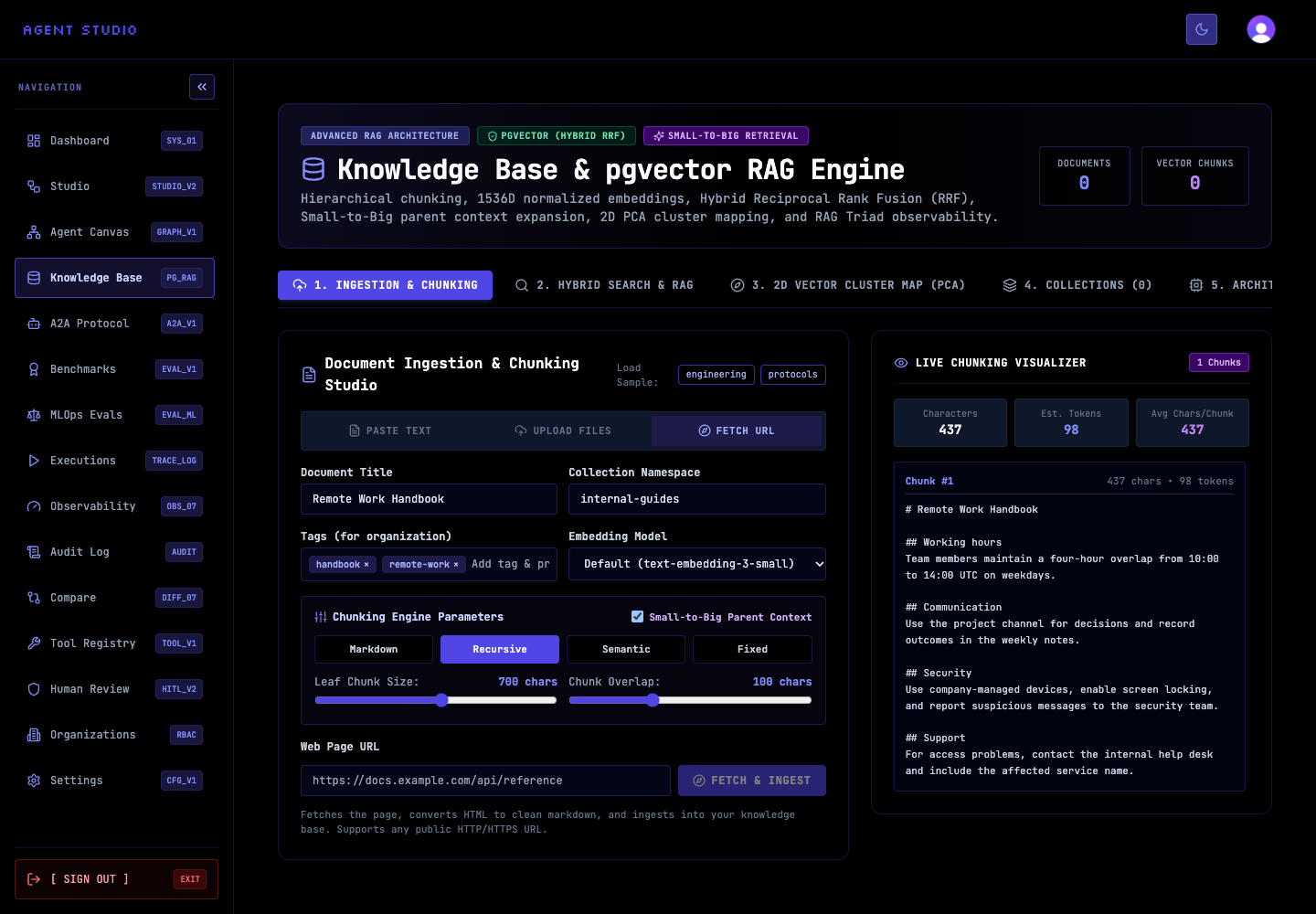
Set the collection and chunking options in Ingestion & Chunking before fetching the page. For example, use a collection named product-docs to keep product documentation separate from other knowledge.
If the collection field is empty, Agent Studio uses default. The selected chunking strategy, chunk size, overlap, and parent-chunk setting apply to the fetched content.
In Web Page URL, enter a complete http:// or https:// address, such as https://docs.example.com/api/reference.
Use the final public page address when possible. Other schemes and malformed addresses are rejected as invalid URLs.
Select FETCH & INGEST. Agent Studio fetches the resource, removes common HTML boilerplate such as navigation and forms, normalizes the remaining content, chunks it, and creates embeddings.
Keep the page open while the control shows Fetching.... A successful request displays Document Successfully Ingested & Indexed in pgvector! with the stored document result.
Open 4. Collections and find the destination collection. Confirm that its document and vector-chunk counts increased, then use View Chunks on the new document if you need to inspect the stored text.
The document title comes from the HTML title element when one exists; otherwise, Agent Studio derives it from the URL.
Verify ingestion
Confirm both the success message and the new entry in 4. Collections. The result records the source URL and reports the generated chunk count and token total. Run a focused query in 2. Hybrid Search & RAG to verify that the expected subject can be retrieved.
Troubleshoot URL ingestion
Next steps
Use Manage knowledge documents to inspect the stored chunks, or Search and answer from knowledge to test retrieval quality.