Manage evaluation datasets
Inspect the bundled golden datasets and create a custom dataset for repeatable evaluations.
Use evaluation datasets to give Agent Studio a fixed set of inputs and expected answers for an automated evaluation. You can inspect four bundled datasets in the dashboard, then create a custom dataset through the datasets API when the bundled domains do not match your workflow.
Before you begin
You need access to Agent Studio and its MLOps Evals dashboard. To create a useful custom dataset, prepare at least one representative input and its expected result. Use synthetic or approved test data; dataset items can contain prompts, context, and reference answers.
Inspect the datasets
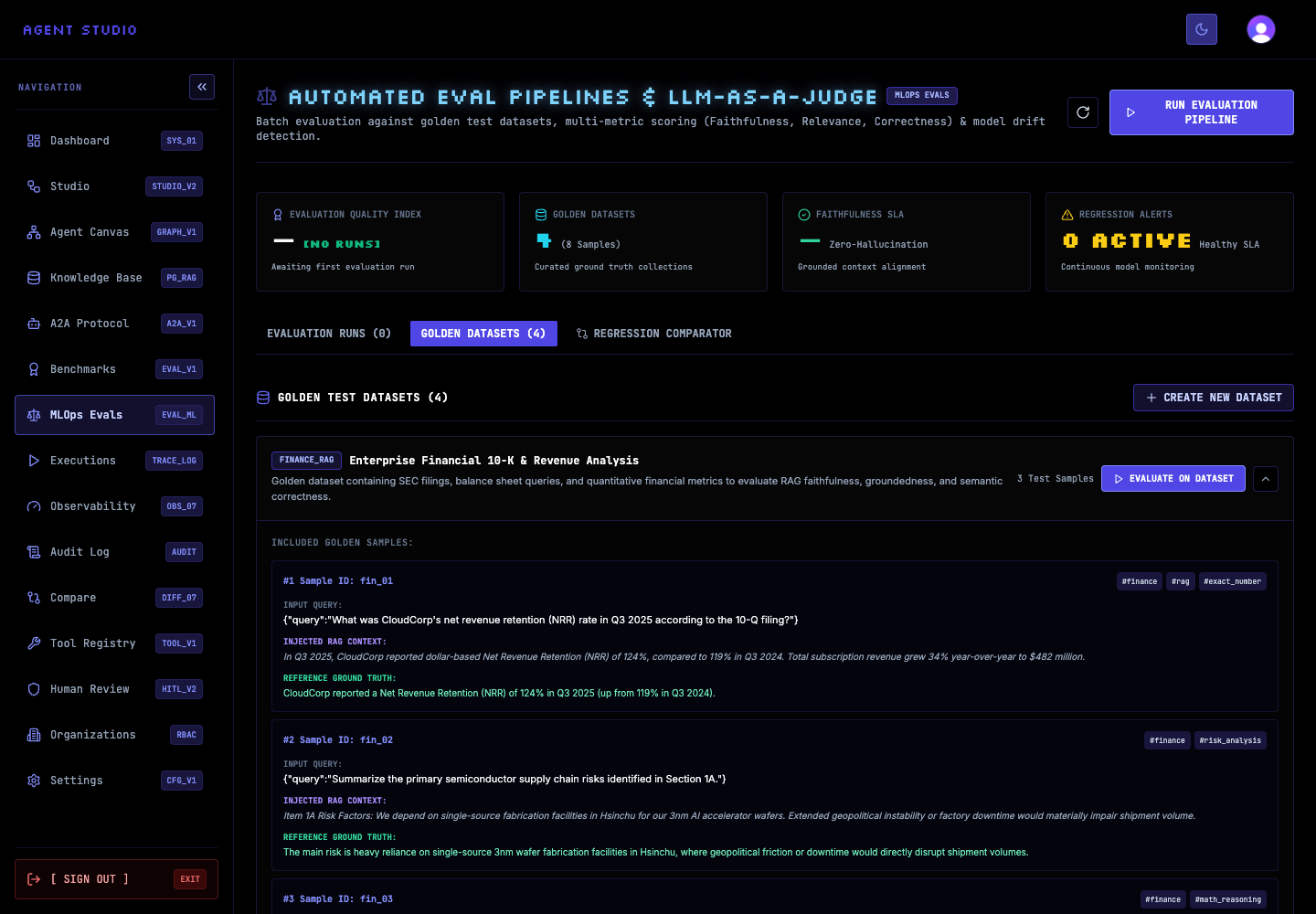
Open /dashboard/evals. The summary reports the current evaluation runs, golden datasets, test samples, and regression alerts.
Select GOLDEN DATASETS. Agent Studio lists four bundled domains: finance RAG, customer support, code generation, and adversarial safety. Each dataset identifies its target type and included samples.
The bundled datasets are useful baselines, but choose a dataset whose inputs and expected behavior resemble the workflow you intend to evaluate.
Select a dataset such as FINANCE_RAG and expand its included samples. Review the INPUT QUERY, INJECTED RAG CONTEXT, and REFERENCE GROUND TRUTH values. These fields show the pattern to follow when you prepare your own items.
Create a JSON file named support-eval.json. The name and items array are required. When omitted, description defaults to Custom Evaluation Dataset, category defaults to CUSTOM, and targetType defaults to GRAPH.
{
  "name": "Support policy checks",
  "description": "Synthetic questions for support-policy grounding",
  "category": "CUSTOMER_SUPPORT",
  "targetType": "SKILL",
  "items": [
    {
      "id": "support_01",
      "input": {
        "query": "When should an urgent ticket be escalated?"
      },
      "context": "Urgent tickets must be escalated to the on-call lead within 15 minutes.",
      "groundTruth": "Escalate the ticket to the on-call lead within 15 minutes.",
      "tags": ["support", "escalation"]
    }
  ]
}
Keep item IDs unique within your dataset and make each expected answer specific enough to evaluate.
Send the file to the Agent Studio instance. Replace http://localhost:3000 if the application uses another base URL.
curl --request POST \
  --header 'Content-Type: application/json' \
  --data @support-eval.json \
  http://localhost:3000/api/evals/datasets
A successful response has success: true and returns the created dataset in data, including a generated ID and timestamps.
Refresh GOLDEN DATASETS. The custom dataset appears after the four bundled datasets, and its sample count matches the number of objects in items.
Verify the dataset
Open the custom dataset and confirm that its name, target type, inputs, context, and ground-truth answers match your source JSON. Use the generated dataset ID when you configure an evaluation run.
GET /api/evals/datasets includes it and the dashboard displays the expected item count.Troubleshooting
Next steps
Use the dataset to run and compare evaluations, or review how Agent Studio works before choosing a target.