Manage knowledge documents
Review knowledge collections, inspect stored chunks, and safely remove documents and their embeddings.
Review the documents in your knowledge base, inspect the chunks used for retrieval, and delete records that should no longer be searchable. This workflow helps you verify ingestion and control the content available to grounded answers.
Before you begin
You must be signed in to Agent Studio. Document inventory and actions are scoped to your authenticated account, so you see and modify only documents available to that account.
Deleting a document also deletes all of its pgvector embedding chunks. This action is appropriate for obsolete, incorrect, or accidentally ingested content, but you should inspect the document before confirming deletion.
Review collections
From Knowledge Base & pgvector RAG Engine, select 4. Collections.
The PostgreSQL pgvector Document Store shows collection summaries followed by Ingested Documents. Each collection summary reports its document count, vector-chunk count, and approximate token total.
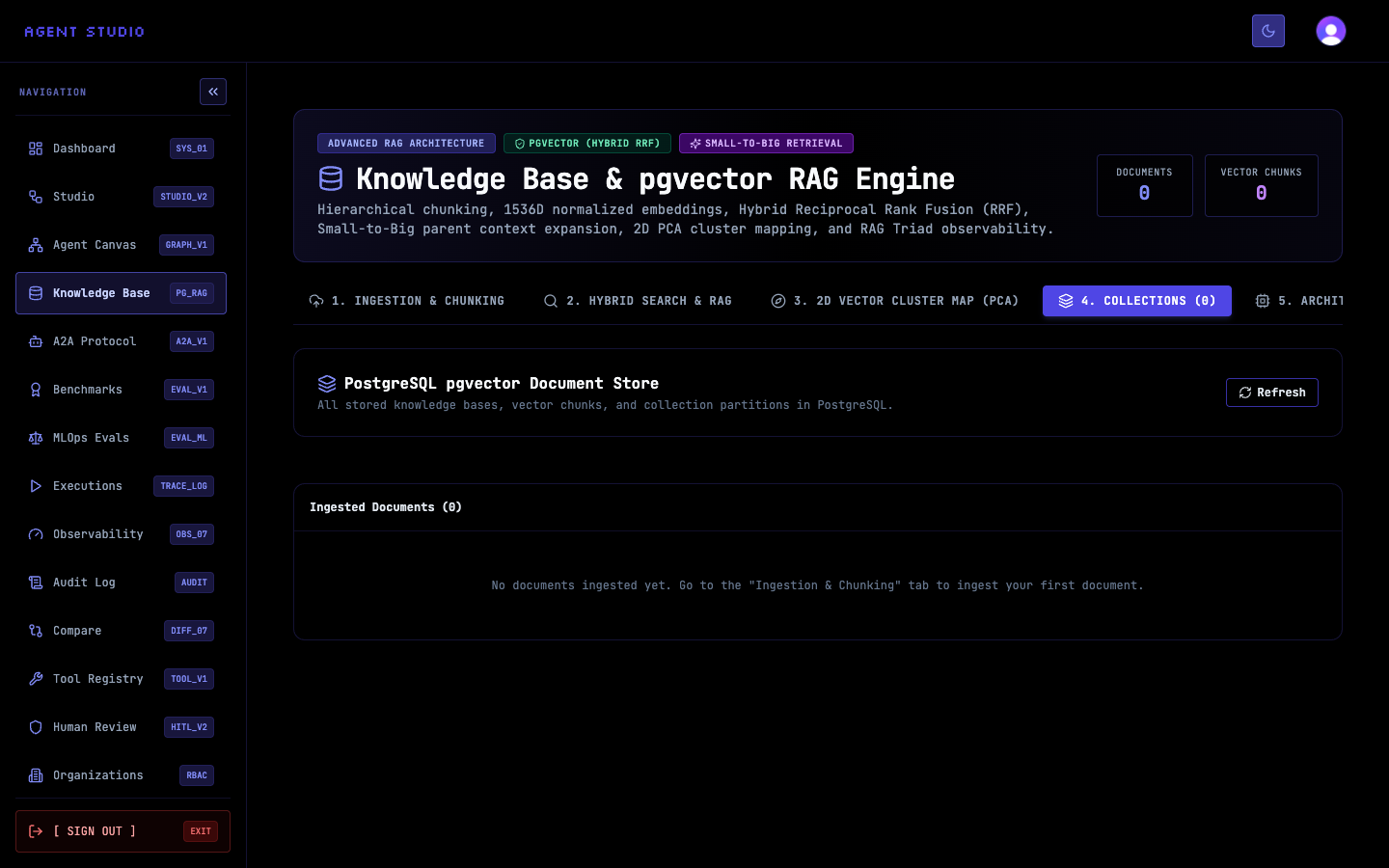
Select Refresh to load the current collections, documents, and storage statistics.
If the store is empty, Ingested Documents (0) appears with guidance to use Ingestion & Chunking. Ingest a source before continuing with inspection or deletion.
Locate the relevant collection summary, then find the document under Ingested Documents. Each row identifies the title, collection, shortened document ID, chunk count, token count, and creation date.
Match both the title and collection before taking an action. Similar titles can belong to different collection partitions.
Select View Chunks for the document. Agent Studio opens Chunks for: _document title_ and reports the total number of vector chunks.
Review the chunk text and indices to confirm that the expected sections were stored. Select Close when you finish. Inspection does not change the document.
When the document and all of its chunks should be removed, select Delete in its row. In the confirmation prompt, confirm only after verifying the title and collection.
Agent Studio deletes the document and its pgvector embeddings, refreshes the inventory, and closes the chunk panel if it displayed the deleted document.
Verify the change
After inspection, verify that Chunks for: _document title_ shows the expected total and content. After deletion, confirm that the document row is gone and that the affected collection's document and chunk counts decreased. Select Refresh if another session may have changed the store.
Troubleshoot document management
Next steps
Use Ingest content from a URL to replace a removed web source, or Search and answer from knowledge to verify the remaining collection.